Personalized Beauty Report — GPT Image 2 prompt template
Products & E-commerce · Product · Layout · Style
A recommendation-report layout: a diagnosis section, a recommendation section and a row of product cards, aligned like a real report page.
Recommendation-report layouts for beauty and lifestyle products. It fits beauty and lifestyle brands, shopping-assistant concepts and content creators who need a structured "here is what suits you" card rather than a single product shot.
When to use it
Use for beauty recommendations, skin reports, shopping assistants, and lifestyle product cards. It sits in the Products & E-commerce group of the catalog, which covers product shots, detail pages, packaging, selling points, and ads. If your brief is closer to one of the neighbouring genres, the related templates at the bottom of this page are the faster route — picking the right template matters more than perfecting the wrong one.
The template
Copy the block, replace everything inside brackets with your own specifics, and delete any line that does not apply to your brief. The template text is published in Chinese, as it appears in the upstream catalog; the structure is what carries the value, so translating the labels into your own language changes nothing about how it works.
你是一个专业美妆顾问 + 人脸分析系统 + 品牌视觉设计系统。
目标:基于[用户自拍]与[口红品牌],生成一张具有“分析 + 推荐 + 试色 + 场景建议”的竖版口红推荐报告信息图。

输入参数:
用户图像:[用户自拍]
品牌:[Dior / YSL / Armani / Chanel / TF / 其他品牌]
风格偏好(可选):[通勤 / 温柔 / 气场 / 氛围感 / 显白优先]
推荐数量:[3-5]

分析层:
- 判断肤色:冷 / 暖 / 中性(含明度)
- 判断气质:清冷 / 温柔 / 明艳 / 干净 / 成熟
- 判断唇部基础:唇色深浅、唇形、适合浓淡
- 输出一句总结:「更适合 [色系] + [饱和度] + [质地] 的口红方向」

推荐层:
从[品牌]中筛选[3-5]个差异化色号,每个色号包含:
- 色号名称
- 色系标签
- 上脸效果
- 推荐场景

品牌视觉层:
根据[品牌]自动生成视觉调性,只用少量品牌强调色做标题、细线、小 icon 和局部点缀。
示例:YSL 黑金强对比,Dior 法式柔光灰白,Armani 低饱和雾面,Chanel 极简黑白,TF 深色电影感。

版式结构:
左上:用户输入图 + 肤色分析
右上:一句分析结论
中部:3-5 个同一张脸的唇色试色矩阵,每列一个色号
底部:有判断力的个人建议

视觉要求:
高端美妆编辑视觉,结构化信息可视化排版,真实皮肤质感,唇色精准,统一光影,9:16 竖版,8K。
JSON version (agent-friendly)
Every Products & E-commerce template shares one JSON block, which expresses the same kind of decisions as key–value fields rather than prose. Use it when a script, an agent or a form fills in the values, or when you want to change a single field between runs and see exactly what changed; swap the example values for your own.
{
  "type": "E-commerce Hero Image",
  "product": {
    "name": "Noise Cancelling Headphones",
    "material": "Matte black finish with metallic accents",
    "angle": "3/4 profile, floating slightly"
  },
  "setting": {
    "background": "Minimalist studio setup, soft gray gradient",
    "lighting": "Softbox overhead, sharp rim light on edges"
  },
  "copywriting": {
    "badges": ["NEW", "$299"],
    "slogan": "Silence the World"
  },
  "constraints": "Commercial photography quality, hyper-realistic textures"
}
How to fill it in
The block above asks you to make 12 explicit decisions before you send anything. That is the point of a template: the decisions you do not make are made for you, and in image generation the defaults are what produce work that looks generic.
Fill in the three tiers in order — what was assessed, what is recommended, and which products carry the recommendation — so the page has an argument rather than a grid of items.
Say that product images, labels and ratings share an alignment. Report layouts read as credible because of their grid, and a stated alignment is what keeps the cards from drifting.
- Use a report-like hierarchy with diagnosis, recommendation, and product cards.
- Keep product images, labels, and ratings aligned.
A working order for the whole thing: fill the structural slots first (subject, layout, format), then the visual ones (palette, light, material), then the text that has to appear verbatim, and only then the mood words. Run it once, change one field, run it again — a template you iterate one variable at a time tells you which variable did the work, which a rewritten prompt never does.
Common mistakes
Medical or clinical claims are the risk unique to this format. Keep the diagnosis language descriptive rather than diagnostic; a generated layout is not a place to assert health outcomes.
Dense annotation is the second problem — long notes under every card render as unreadable grey texture, so keep each card to a label and a short line.
- Avoid medical claims and unreadable dense notes.
- Keep recommendation logic simple.
Example results
These are the public posts this template was distilled from: the creator shared the image and the prompt behind it, and the recurring structure across cases like these became the block above. Each card links back to its source, and a public post is not a licence to reuse the image.
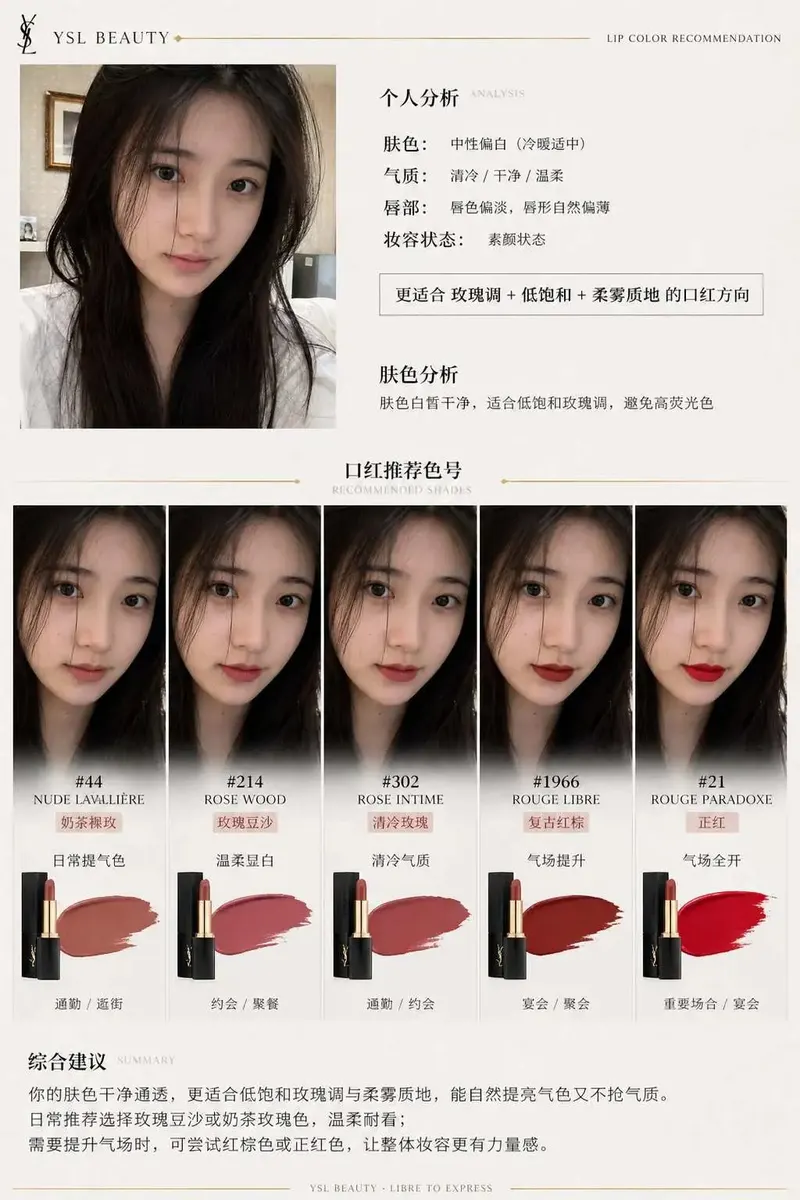
品牌口红推荐报告信息图
一、系统角色 你是一个专业美妆顾问 + 人脸分析系统 + 品牌视觉设计系统。 你的任务是:基于用户上传自拍与指定口红品牌,生成一张具有品牌调性的“口红推荐报告信息结构图”。 二、输入参数 用户图像:{用户自拍} 品牌:{口红品牌,如 Dior / YSL / Armani / Chanel / TF} 风格偏好(可选)

More templates in this category
The catalog keys its blocks by category, so every Products & E-commerce template ships with the same set of 3. The one above is the block that matches this template; these 1 are its neighbours, kept here in case one of them is closer to your brief.
Standard template
生成[商品名]电商主图,卖点为[卖点1]、[卖点2]。
场景:[纯色棚拍/生活方式场景],镜头:[特写/半身/全景]。
材质细节:[材质关键词],灯光:[柔光/侧光/轮廓光]。
附加元素:[价格角标/卖点icon/促销文案]。
输出:电商平台可直接使用的商品展示图。
Related templates
- Product Commerce Visual — Product shots, packaging, detail pages, and selling-point layouts.
- Brand Identity Package — Logo, palette, typography, applications, and brand touchpoints.
- Brand Touchpoint Board — Campaign boards across packaging, social, web, and display contexts.
- Architecture & Space — Interior, exterior, city, map, and spatial concept visuals.
- Realistic Photography — Lens, lighting, film texture, and documentary-style photo prompts.
Frequently asked questions
- Can this layout be used for other product categories?
- Yes. The structure is diagnosis, recommendation and product cards, which transfers directly to skincare, nutrition, styling or gear guides — only the vocabulary in the slots changes.
- Why does the template warn against medical claims?
- Because a report layout looks authoritative, and text rendered inside an image is easy to screenshot and hard to caveat. Keep the wording to preferences and attributes rather than conditions and cures.
- Is the Personalized Beauty Report template free to use?
- Yes. The template text comes from the open-source awesome-gpt-image-2 catalog by freestylefly, published under the MIT licence, and PicGens reproduces it with credit. Copy it, fill in the brackets and paste it into whichever tool you run GPT Image 2 in.
- What is the JSON version of the template for?
- It carries the same decisions as key–value fields instead of prose, which is easier for an agent or a script to assemble programmatically and easier to diff when you iterate. Use the plain-text block when you are writing by hand and the JSON block when something else is filling in the values.
- Why does this page show other Products & E-commerce templates?
- The upstream catalog groups its blocks by category, so every Products & E-commerce template ships with the same set of 3 blocks. The one at the top of this page is the block that matches this template; the remaining 1 are kept collapsed in case a neighbouring variant fits your brief better.
- Where do the example results come from?
- They are public posts by creators who shared both the image and the prompt behind it, collected in the same open catalog. Each one links back to its source, and a public post is not itself a licence to reuse the image.
中文说明
个性化美妆报告 — 生成美妆与生活方式产品的推荐报告版式。
用于美妆推荐、肤质报告、导购助手和生活方式商品卡片。
- 使用诊断、推荐和商品卡片的报告层级。
- 对齐商品图、标签和评分。
- 避免医疗化结论和难读小字。
- 保持推荐逻辑清楚。
Keep exploring
Template text and case metadata from awesome-gpt-image-2 by freestylefly, used under the MIT licence. English commentary by PicGens. Results vary by model version, reference image and settings.