Architecture & Space — GPT Image 2 prompt template
Architecture & Spaces · Architecture · Interior · Map
Interiors, exteriors, city views and spatial concepts, built from an explicit viewpoint, scale, material set and lighting condition.
Interior, exterior, city, map, and spatial concept visuals. It fits architects and interior designers producing concept visuals, and anyone who needs a room or a building to read as a plausible space rather than a rendering-shaped blur.
When to use it
Use for interiors, architecture renders, city maps, spatial plans, and environment concepts. It sits in the Architecture & Spaces group of the catalog, which covers architecture renders, interiors, city maps, and spatial concepts. If your brief is closer to one of the neighbouring genres, the related templates at the bottom of this page are the faster route — picking the right template matters more than perfecting the wrong one.
The template
Copy the block, replace everything inside brackets with your own specifics, and delete any line that does not apply to your brief. The template text is published in Chinese, as it appears in the upstream catalog; the structure is what carries the value, so translating the labels into your own language changes nothing about how it works.
生成[空间类型]设计效果图,功能定位为[用途]。
风格:[现代简约/工业/新中式],材质:[木/石/金属/玻璃]。
空间结构:[开敞/分区],动线:[主通道说明]。
光线:[自然采光/人工照明方案],时间:[白天/夜景]。
输出:写实建筑空间渲染图。
JSON version (agent-friendly)
Every Architecture & Spaces template shares one JSON block, which expresses the same kind of decisions as key–value fields rather than prose. Use it when a script, an agent or a form fills in the values, or when you want to change a single field between runs and see exactly what changed; swap the example values for your own.
{
  "type": "Architectural Visualization",
  "space": {
    "type": "Modern Cabin Interior",
    "function": "Living room",
    "materials": "Exposed concrete, large floor-to-ceiling glass, warm timber accents"
  },
  "environment": "Nestled in a dense, snowy pine forest visible through the glass",
  "camera": {
    "angle": "Eye-level perspective, wide-angle lens",
    "lighting": "Golden hour, warm interior lights glowing, cool blue ambient light outside"
  },
  "render_quality": "Unreal Engine 5 style, hyper-realistic, 8k resolution, ray tracing"
}
How to fill it in
The block above asks you to make 8 explicit decisions before you send anything. That is the point of a template: the decisions you do not make are made for you, and in image generation the defaults are what produce work that looks generic.
Set viewpoint and scale first — eye level in a room, a raised three-quarter view of a facade, a plan-like overhead. Every other decision in the block depends on where the camera stands.
Then name materials, the light source and the function of the space. Function is what makes furniture, circulation and proportion agree with each other instead of merely coexisting.
- Define viewpoint, scale, material, lighting, and spatial function.
- For maps, specify landmarks, labels, border decoration, and visual accuracy level.
A working order for the whole thing: fill the structural slots first (subject, layout, format), then the visual ones (palette, light, material), then the text that has to appear verbatim, and only then the mood words. Run it once, change one field, run it again — a template you iterate one variable at a time tells you which variable did the work, which a rewritten prompt never does.
Common mistakes
Impossible perspectives — several vanishing points, walls that cannot meet — are acceptable in a conceptual image and fatal in one meant to look buildable, so decide which you are making and say so.
For maps, unstated label language and loose placement produce decorative geography: pretty, and wrong about where things are. Fix the language and the relative positions in the prompt.
- Avoid impossible perspectives unless the output is conceptual.
- Lock map label language and relative placement.
Example results
These are the public posts this template was distilled from: the creator shared the image and the prompt behind it, and the recurring structure across cases like these became the block above. Each card links back to its source, and a public post is not a licence to reuse the image.
Hand-Drawn Xi'an Watercolor Map
生成一张手绘水彩风格的「西安」城市地图,包含当地特色美食、地标建筑及城市特色
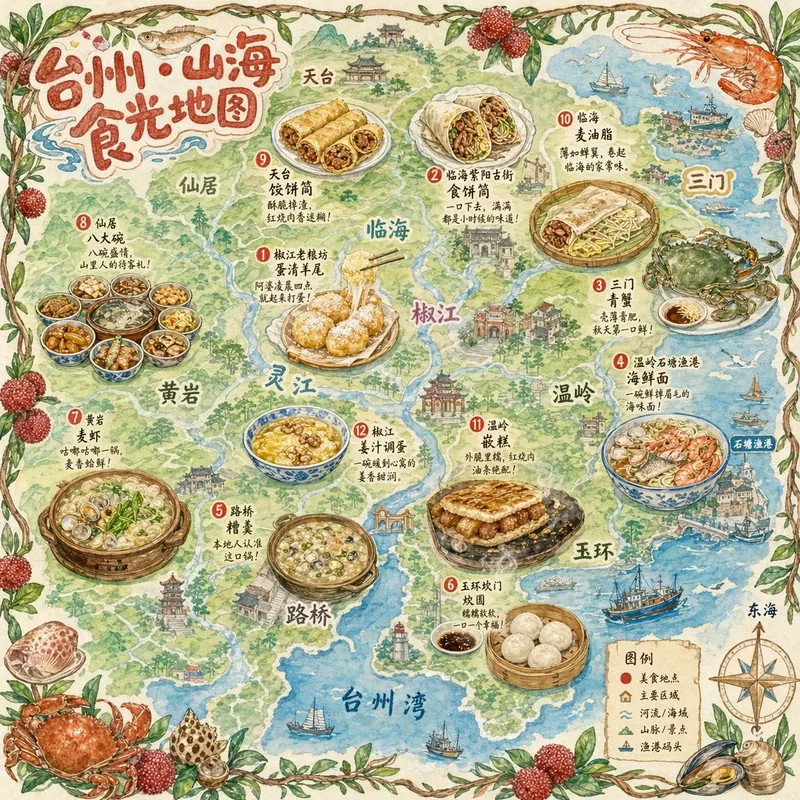
一张手绘风格的城市美食地图,以台州为主题
一张手绘风格的城市美食地图,以台州为主题。画面以鸟瞰视角的手绘简化城市地图为底,标注椒江、路桥、黄岩等区域和灵江、台州湾等水系地标,不追求精确比例而是追求可爱的水彩手绘感。地图上分布着12个美食地点的精致手绘小插画:1. 椒江老粮坊的蛋清羊尾(金黄蓬松的蛋泡甜点撒着糖粉,筷子夹起拉丝)2. 临海紫阳古街的食饼筒(一个饱

Related templates
- Realistic Photography — Lens, lighting, film texture, and documentary-style photo prompts.
- Street Accident Moment — Realistic phone-photo scenes with negative constraints.
- Illustration & Art Style — Anime, watercolor, ink, material experiments, and art direction.
- Character Design Sheet — Characters, pose sheets, action grids, and identity consistency.
- 3D Collectible Toy — Reference photo to premium 3D collectible figure prompts.
Frequently asked questions
- Can this template produce floor plans or maps?
- It covers map and spatial-plan cases, and the block has slots for landmarks, labels and border decoration. Accuracy still has to come from you: state the relative placement you want rather than expecting a correct geography.
- How do I get realistic interior lighting?
- Name the source and the time — a north window in the afternoon, warm downlights at night — instead of asking for "good lighting". A named source produces consistent shadows across the whole room.
- Is the Architecture & Space template free to use?
- Yes. The template text comes from the open-source awesome-gpt-image-2 catalog by freestylefly, published under the MIT licence, and PicGens reproduces it with credit. Copy it, fill in the brackets and paste it into whichever tool you run GPT Image 2 in.
- What is the JSON version of the template for?
- It carries the same decisions as key–value fields instead of prose, which is easier for an agent or a script to assemble programmatically and easier to diff when you iterate. Use the plain-text block when you are writing by hand and the JSON block when something else is filling in the values.
- Where do the example results come from?
- They are public posts by creators who shared both the image and the prompt behind it, collected in the same open catalog. Each one links back to its source, and a public post is not itself a licence to reuse the image.
中文说明
建筑与空间 — 生成室内、建筑、城市地图和空间概念视觉。
用于室内、建筑表现、城市地图、空间规划和环境概念图。
- 定义视角、尺度、材质、光线和空间功能。
- 地图需要指定地标、标签、边框装饰和准确度。
- 概念图之外要避免不合理透视。
- 锁定地图标签语言和相对位置。
Keep exploring
Template text and case metadata from awesome-gpt-image-2 by freestylefly, used under the MIT licence. English commentary by PicGens. Results vary by model version, reference image and settings.