Document & Publishing — GPT Image 2 prompt template
Documents & Publishing · Document · Publishing · Layout
Page systems rather than pictures: white papers, manuals, encyclopedic plates and report spreads, built from a stated page size, column grid and type hierarchy.
White papers, manuals, encyclopedic plates, and page systems. Use it for layout comps, pitch mockups of a publication, and editorial concepts where the deliverable is a page that looks typeset.
When to use it
Use for white papers, manuals, encyclopedic plates, report pages, and publication systems. It sits in the Documents & Publishing group of the catalog, which covers white papers, manuals, encyclopedic plates, and publishing layouts. If your brief is closer to one of the neighbouring genres, the related templates at the bottom of this page are the faster route — picking the right template matters more than perfecting the wrong one.
The template
Copy the block, replace everything inside brackets with your own specifics, and delete any line that does not apply to your brief. The template text is published in Chinese, as it appears in the upstream catalog; the structure is what carries the value, so translating the labels into your own language changes nothing about how it works.
制作[文档类型,如菜单/杂志内页/报纸版式]。
版面结构:[栏数/页边距/标题层级]。
内容模块:[封面区/正文区/图表区/脚注]。
字体风格:[衬线/无衬线],配色:[配色方案]。
输出:可读性强、版式规范的出版物视觉稿。
JSON version (agent-friendly)
Every Documents & Publishing template shares one JSON block, which expresses the same kind of decisions as key–value fields rather than prose. Use it when a script, an agent or a form fills in the values, or when you want to change a single field between runs and see exactly what changed; swap the example values for your own.
{
  "type": "Editorial Layout",
  "document": "Fashion Magazine Double-page Spread",
  "grid": "3-column grid, wide margins",
  "content": {
    "left_page": "Full-bleed high-fashion photograph of a model in a red dress",
    "right_page": {
      "headline": "THE RED RENAISSANCE",
      "body_text": "(Simulated text blocks)",
      "pull_quote": "\"Color is power.\""
    }
  },
  "typography": "Elegant serif for headlines, clean sans-serif for body",
  "palette": "Monochrome with stark red accents"
}
How to fill it in
The block above asks you to make 5 explicit decisions before you send anything. That is the point of a template: the decisions you do not make are made for you, and in image generation the defaults are what produce work that looks generic.
Set the page format first — size, columns, margins — then the type hierarchy and the figure system, because everything else in the block hangs off that grid.
Ask for headings, tables, captions and page rhythm by name, and keep the body text sparse: at page scale, generated body copy is texture, and its job here is to show rhythm rather than to be read.
- Define page size, columns, table of contents, figure system, and typography hierarchy.
- Use readable headings, tables, labels, and page rhythm.
A working order for the whole thing: fill the structural slots first (subject, layout, format), then the visual ones (palette, light, material), then the text that has to appear verbatim, and only then the mood words. Run it once, change one field, run it again — a template you iterate one variable at a time tells you which variable did the work, which a rewritten prompt never does.
Common mistakes
Requesting dense small text guarantees an unusable comp — it renders as grey noise and often as garbled characters, which undermines the credibility of the whole page.
Charts and captions that ignore the grid are the other giveaway; state that figures align to the columns so the page reads as designed rather than assembled.
- Avoid tiny dense text.
- Keep charts and captions aligned to the page grid.
Example results
These are the public posts this template was distilled from: the creator shared the image and the prompt behind it, and the recurring structure across cases like these became the block above. Each card links back to its source, and a public post is not a licence to reuse the image.
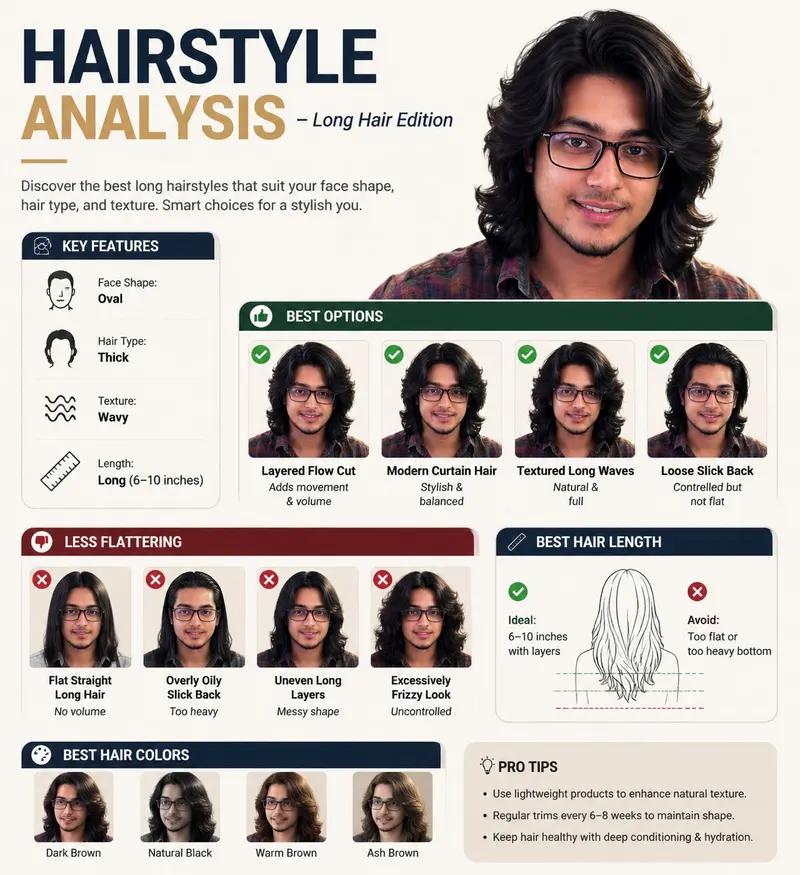
长发造型分析信息图
Create a professional "HAIRSTYLE ANALYSIS" infographic with a different male model (the same face) having long, thick hair (6-10 inches), slightly wavy texture.

More templates in this category
The catalog keys its blocks by category, so every Documents & Publishing template ships with the same set of 3. The one above is the block that matches this template; these 1 are its neighbours, kept here in case one of them is closer to your brief.
Corporate brochure system template
请生成一套企业级商用画册视觉方案,主题为【品牌名称】的【行业 / 产品 / 解决方案】宣传画册。

整体风格:高端、专业、具有强视觉冲击力;避免传统 Word 排版感和普通 PPT 感。采用【深色科技美学 / 白色极简商务 / 高端工业风 / 艺术化品牌画册】风格。

画册内容包括:
1、封面与封底
2、企业介绍与品牌理念
3、核心产品与技术优势
4、应用场景与解决方案
5、客户案例与合作方式
6、全册系统预览图

要求:
版式要有设计感,图片、标题、数据、图标、留白和层级关系清晰;保持整套画册统一的品牌视觉系统;重点体现真实商业物料的完成度,避免简单文字排版。
Related templates
- Concept Product Breakdown — R&D boards, exploded views, mixed tasks, and special outputs.
- UI Screenshot System — High-fidelity app, web, dashboard, and social interface prompts.
- Infographic Engine — Structured diagrams, timelines, knowledge maps, and explainers.
- Scientific Scale Diagram — Multi-scale science visuals with readable labels and hierarchy.
- Poster Layout System — Event, product, movie, and social poster compositions.
Frequently asked questions
- Is the text inside the page real?
- Treat it as placeholder. A generated page is a layout comp: the structure, hierarchy and rhythm are the useful output, and any copy that ships should be set in a real layout tool.
- Can I generate a multi-page document?
- Generate a page at a time with the same grid and hierarchy stated in each prompt. Asking for a whole document in one image reduces every page below readable size.
- Is the Document & Publishing template free to use?
- Yes. The template text comes from the open-source awesome-gpt-image-2 catalog by freestylefly, published under the MIT licence, and PicGens reproduces it with credit. Copy it, fill in the brackets and paste it into whichever tool you run GPT Image 2 in.
- What is the JSON version of the template for?
- It carries the same decisions as key–value fields instead of prose, which is easier for an agent or a script to assemble programmatically and easier to diff when you iterate. Use the plain-text block when you are writing by hand and the JSON block when something else is filling in the values.
- Why does this page show other Documents & Publishing templates?
- The upstream catalog groups its blocks by category, so every Documents & Publishing template ships with the same set of 3 blocks. The one at the top of this page is the block that matches this template; the remaining 1 are kept collapsed in case a neighbouring variant fits your brief better.
- Where do the example results come from?
- They are public posts by creators who shared both the image and the prompt behind it, collected in the same open catalog. Each one links back to its source, and a public post is not itself a licence to reuse the image.
中文说明
文档与出版物 — 生成白皮书、手册、百科图鉴和页面系统。
用于白皮书、手册、百科图鉴、报告页面和出版系统。
- 定义页面尺寸、分栏、目录、图表系统和字体层级。
- 使用可读标题、表格、标签和页面节奏。
- 避免密集小字。
- 让图表和说明对齐页面网格。
Keep exploring
Template text and case metadata from awesome-gpt-image-2 by freestylefly, used under the MIT licence. English commentary by PicGens. Results vary by model version, reference image and settings.