Concept Product Breakdown — GPT Image 2 prompt template
Other Use Cases · Creative · R&D · Special
An R&D board: a concept object, its components pulled apart, callout labels and a stated material logic, presented as a technical sheet.
R&D boards, exploded views, mixed tasks, and special outputs. It is for concept designers, hardware pitches and explainer content where a product has to be shown as a system of parts rather than a finished shell.
When to use it
Use for experimental prompt tasks, R&D boards, exploded diagrams, and unusual visual systems. It sits in the Other Use Cases group of the catalog, which covers creative experiments, special tasks, mixed workflows, and practical cases. If your brief is closer to one of the neighbouring genres, the related templates at the bottom of this page are the faster route — picking the right template matters more than perfecting the wrong one.
The template
Copy the block, replace everything inside brackets with your own specifics, and delete any line that does not apply to your brief. The template text is published in Chinese, as it appears in the upstream catalog; the structure is what carries the value, so translating the labels into your own language changes nothing about how it works.
为[产品/家具/装置]生成一张完整的概念产品研发拆解板,而不是单张成品渲染图。

核心概念:
把[灵感来源,如揉皱纸团/贝壳/折纸/机械结构]转译成[产品类型]。
设计哲学:[一句话说明功能与情绪,例如“把受控混乱转化为高舒适度座椅”]。

画面结构:
中心:高质量 hero render,展示最终产品的主要形态、材质和比例。
左侧:观察与形态分析,包含灵感图、轮廓提取、结构线、折痕/纹理/受力方向标注。
中部:形态迭代过程,展示从原始形态到产品外壳的 3-5 个演化步骤。
下方:人体工学或使用场景验证,包含尺寸、角度、使用姿态和关键功能说明。
右侧:结构集成与材料方案,展示内部骨架、外壳、软垫/面料/连接件等分层拆解。
底部:最终材质、表面纹理、颜色方案和关键规格表。

视觉风格:
工业设计提案板,干净白底或浅灰背景,技术图纸 + 产品摄影混合风格,细线标注,清晰标题,真实阴影,材质细节可见。

约束:
不要只画一个漂亮产品;必须展示分析、迭代、人体工学、结构、材料和规格。
不要让文字挤满画面;每个阶段只保留短标题和关键标签。
产品外形应保留[灵感来源]的识别特征,但必须看起来可制造、可使用。
JSON version (agent-friendly)
Every Other Use Cases template shares one JSON block, which expresses the same kind of decisions as key–value fields rather than prose. Use it when a script, an agent or a form fills in the values, or when you want to change a single field between runs and see exactly what changed; swap the example values for your own.
{
  "type": "Custom Generation",
  "objective": "Generate [Specific content]",
  "inputs": {
    "subject": "[Main subject details]",
    "scene": "[Background and context]",
    "style": "[Artistic/Visual style]",
    "palette": "[Color scheme]"
  },
  "quality_constraints": {
    "resolution": "8k, hyper-detailed",
    "aspect_ratio": "[e.g., 16:9]",
    "composition": "[e.g., Rule of thirds]"
  },
  "output_requirements": {
    "usage": "[Intended use case]",
    "focus": "[Key element to highlight]"
  }
}
How to fill it in
The block above asks you to make 5 explicit decisions before you send anything. That is the point of a template: the decisions you do not make are made for you, and in image generation the defaults are what produce work that looks generic.
Declare the artifact type and its components before anything else, and say how the breakdown is arranged — exploded along an axis, layered, or sectioned.
Then define the material logic and the callout style, so the labels look like engineering annotation instead of floating captions.
- Define the artifact type, components, labels, material logic, and final presentation format.
- Use clear callouts and a controlled technical style.
A working order for the whole thing: fill the structural slots first (subject, layout, format), then the visual ones (palette, light, material), then the text that has to appear verbatim, and only then the mood words. Run it once, change one field, run it again — a template you iterate one variable at a time tells you which variable did the work, which a rewritten prompt never does.
Common mistakes
Unspecified mixed tasks are the category's particular hazard: asking for a breakdown, a hero shot and a spec table at once yields a board that does none of them properly.
Long labels break the technical look and obscure the component relationships the board exists to show, so keep annotation short and the connections visible.
- Avoid unspecified mixed tasks.
- Keep labels short and component relationships visible.
Example results
These are the public posts this template was distilled from: the creator shared the image and the prompt behind it, and the recurring structure across cases like these became the block above. Each card links back to its source, and a public post is not a licence to reuse the image.
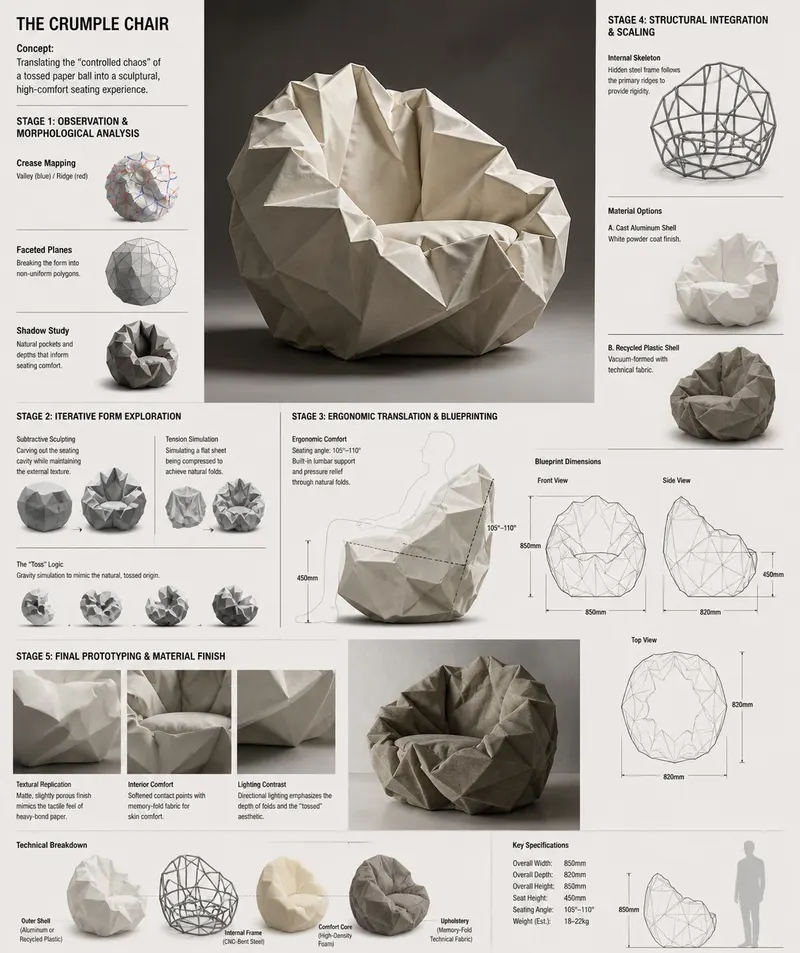
Crumple Chair 概念沙发研发板
Design Concept: The Crumple Chair Core Philosophy: Translating the "controlled chaos" of a tossed paper ball into a sculptural, high-comfort seating experience.
手机爆炸拆解图
Create a 3D Insane detailed exploded assembly drawing of [subject or object]
@Ankit_patel211Fillable slots

More templates in this category
The catalog keys its blocks by category, so every Other Use Cases template ships with the same set of 3. The one above is the block that matches this template; these 1 are its neighbours, kept here in case one of them is closer to your brief.
Standard template
任务目标:[你要生成的内容类型]。
输入约束:主体[主体],场景[场景],风格[风格],色彩[配色]。
质量约束:清晰度[高清/4K],比例[比例],构图[构图方式]。
输出约束:用于[用途],需突出[核心信息]。
请输出一版主方案 + 一版备选方案。
Related templates
- UI Screenshot System — High-fidelity app, web, dashboard, and social interface prompts.
- Infographic Engine — Structured diagrams, timelines, knowledge maps, and explainers.
- Scientific Scale Diagram — Multi-scale science visuals with readable labels and hierarchy.
- Poster Layout System — Event, product, movie, and social poster compositions.
- Sports Campaign Poster — Commercial sports visuals with athletes, props, and brand color.
Frequently asked questions
- What kind of products suit an exploded view?
- Anything with a legible internal order — devices, tools, packaging, wearables. Objects that are essentially one solid form gain little from being pulled apart.
- Are the technical labels accurate?
- They are as accurate as what you write into the block. The render letters your callouts; it does not verify engineering, so treat the board as a communication artifact rather than documentation.
- Is the Concept Product Breakdown template free to use?
- Yes. The template text comes from the open-source awesome-gpt-image-2 catalog by freestylefly, published under the MIT licence, and PicGens reproduces it with credit. Copy it, fill in the brackets and paste it into whichever tool you run GPT Image 2 in.
- What is the JSON version of the template for?
- It carries the same decisions as key–value fields instead of prose, which is easier for an agent or a script to assemble programmatically and easier to diff when you iterate. Use the plain-text block when you are writing by hand and the JSON block when something else is filling in the values.
- Why does this page show other Other Use Cases templates?
- The upstream catalog groups its blocks by category, so every Other Use Cases template ships with the same set of 3 blocks. The one at the top of this page is the block that matches this template; the remaining 1 are kept collapsed in case a neighbouring variant fits your brief better.
- Where do the example results come from?
- They are public posts by creators who shared both the image and the prompt behind it, collected in the same open catalog. Each one links back to its source, and a public post is not itself a licence to reuse the image.
中文说明
概念产品研发拆解 — 生成研发板、拆解图、混合任务和特殊输出。
用于实验型任务、研发视觉板、拆解图和特殊视觉系统。
- 定义产物类型、组件、标签、材质逻辑和展示格式。
- 使用清晰标注和受控技术风格。
- 避免任务边界过泛。
- 标签要短,组件关系要清楚。
Keep exploring
Template text and case metadata from awesome-gpt-image-2 by freestylefly, used under the MIT licence. English commentary by PicGens. Results vary by model version, reference image and settings.