Character Design Sheet — GPT Image 2 prompt template
Characters & People · Character · Pose · Style
A model sheet: one character rendered across several poses on a laid-out grid, with identity anchors that stay fixed between them.
Characters, pose sheets, action grids, and identity consistency. It is for game and animation pre-production, comic and VTuber work, and any project where the same character has to reappear and still be the same character.
When to use it
Use for character sheets, pose grids, action breakdowns, and identity references. It sits in the Characters & People group of the catalog, which covers character design, pose references, cards, and 3D toys. If your brief is closer to one of the neighbouring genres, the related templates at the bottom of this page are the faster route — picking the right template matters more than perfecting the wrong one.
The template
Copy the block, replace everything inside brackets with your own specifics, and delete any line that does not apply to your brief. The template text is published in Chinese, as it appears in the upstream catalog; the structure is what carries the value, so translating the labels into your own language changes nothing about how it works.
设计[角色身份]角色设定图。
外观:[年龄/发型/服饰/配件],性格:[关键词]。
姿态:[站姿/动态动作],表情:[情绪]。
世界观:[时代/阵营/职业],标志性元素:[元素]。
输出:角色主视图 + 风格统一的人设图。
JSON version (agent-friendly)
Every Characters & People template shares one JSON block, which expresses the same kind of decisions as key–value fields rather than prose. Use it when a script, an agent or a form fills in the values, or when you want to change a single field between runs and see exactly what changed; swap the example values for your own.
{
  "type": "Character Concept Art",
  "character": {
    "identity": "Cybernetic Bounty Hunter",
    "appearance": "Short silver hair, glowing red synthetic left eye, athletic build",
    "attire": "Tactical trench coat with neon piping, holding a plasma rifle"
  },
  "pose": "Dynamic action stance, looking over shoulder with a smirk",
  "environment": "Rainy neon-lit alleyway background (blurred)",
  "style": "Concept art, sharp linework, vibrant cyberpunk palette"
}
How to fill it in
The block above asks you to make 7 explicit decisions before you send anything. That is the point of a template: the decisions you do not make are made for you, and in image generation the defaults are what produce work that looks generic.
Write the identity anchors as a checklist — face shape, hairstyle, costume details, proportions — because they are what every pose in the sheet has to agree on.
Then set the pose count and the sheet layout: a row, a grid, a turnaround. The layout decides how much canvas each pose gets, and therefore how much detail survives.
- Define identity anchors, outfit, proportions, pose count, and sheet layout.
- Keep face, hairstyle, and costume details consistent.
A working order for the whole thing: fill the structural slots first (subject, layout, format), then the visual ones (palette, light, material), then the text that has to appear verbatim, and only then the mood words. Run it once, change one field, run it again — a template you iterate one variable at a time tells you which variable did the work, which a rewritten prompt never does.
Common mistakes
Costume details wandering between poses is the standard failure of a generated sheet, and the fix is repetition: name the details rather than assuming they carry across.
Crowding is the other one. Every pose you add shrinks the rest, so cut the count before you cut the detail.
- Avoid changing costume details between poses.
- Limit pose count if the sheet becomes crowded.
Example results
These are the public posts this template was distilled from: the creator shared the image and the prompt behind it, and the recurring structure across cases like these became the block above. Each card links back to its source, and a public post is not a licence to reuse the image.
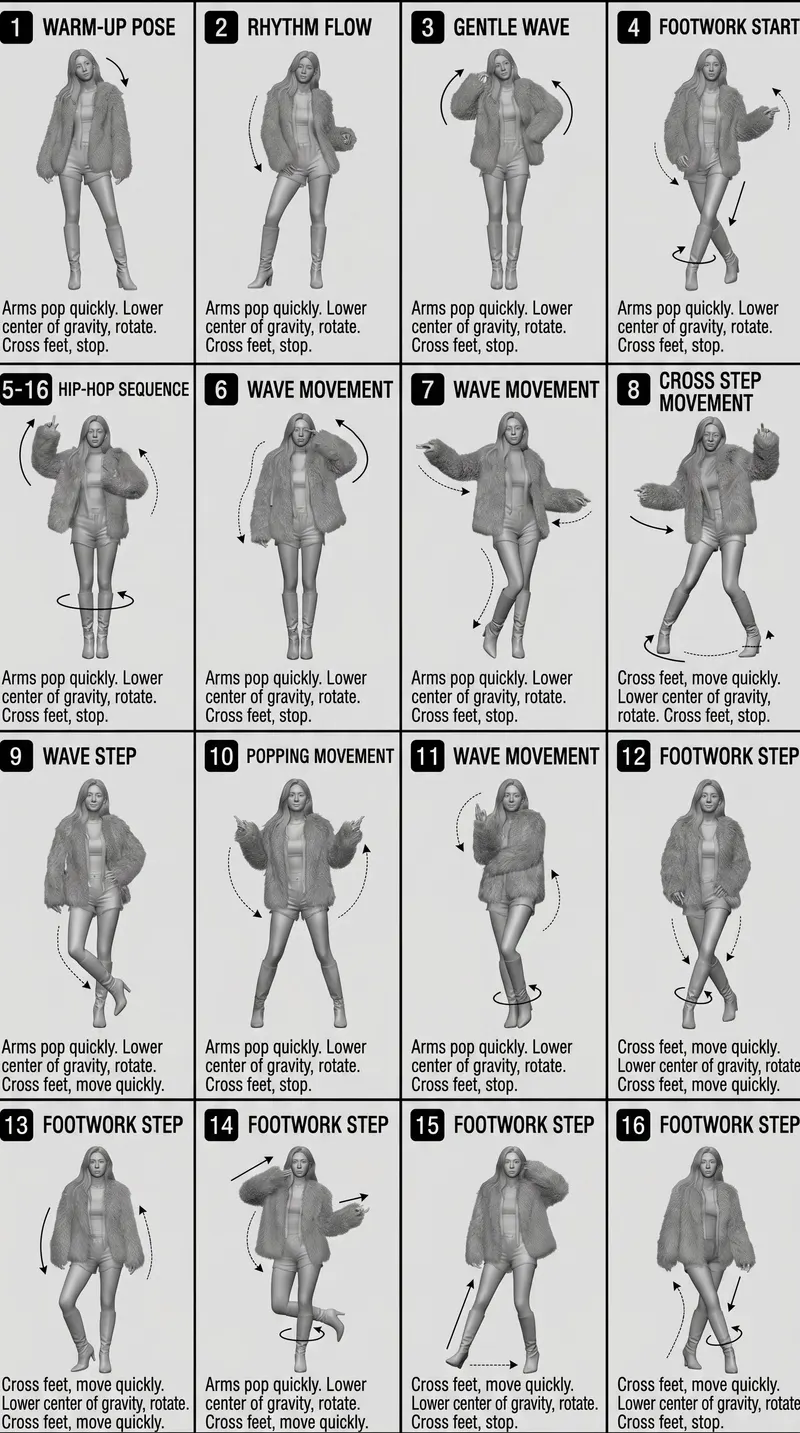
4×4 动作分解参考表
[STYLE] Monochrome grayscale illustration, 3D-rendered character, clean instructional reference sheet, white background, comic-style cell grid layout, technical
@oggii_0Fillable slotsOpen in the template workspace

More templates in this category
The catalog keys its blocks by category, so every Characters & People template ships with the same set of 4. The one above is the block that matches this template; these 2 are its neighbours, kept here in case one of them is closer to your brief.
Pose breakdown reference sheet template
生成一张[角色/人物]动作分解参考表。
风格:[黑白线稿/3D 灰阶/漫画分镜/教学图],背景纯净,技术参考图气质。
版式:4×4 网格,共 16 个等尺寸面板,细线分隔,每格左上角编号 1-16。
角色一致性:所有面板使用同一角色,保持脸型、服装、比例和发型一致。
每格结构:
- 顶部:动作标题
- 中央:完整身体动作姿态
- 底部:3-4 行动作说明
- 叠加:方向箭头、旋转箭头或运动轨迹线
动作序列:[从基础站姿到结束动作的完整步骤]
约束:不要复杂背景,不要新增角色,不要彩色干扰,不要改变角色身份。
输出:清晰可读、可用于动画/舞蹈/游戏动作参考的角色动作表。
Reference photo to 3D collectible toy template
将输入照片转换为高端 3D 收藏玩具形象。
身份保持:保留原始人物/角色的脸部身份、主要发型、表情气质和服装识别点。
造型比例:大头设计,五官轻微夸张,身体比例玩具化,但整体仍保持高级设计感。
材质:哑光 vinyl / resin / collectible figure finish,皮肤和服饰材质要有细节。
灯光与背景:柔和棚拍光,干净背景,[黑色/白色/品牌色],主体居中,轮廓清晰。
质感:超清锐度,真实材质反射,8K render,premium designer toy aesthetic。
约束:不要改变身份,不要廉价塑料感,不要多角色,不要复杂背景,不要文字水印。
输出:一张完整的高端收藏玩具渲染图。
Related templates
- 3D Collectible Toy — Reference photo to premium 3D collectible figure prompts.
- Scene Storytelling — Storyboards, worldbuilding, narrative scenes, and emotional pacing.
- History & Classical Themes — Dynasty clothing, scroll narrative, poetry, and traditional motifs.
- Document & Publishing — White papers, manuals, encyclopedic plates, and page systems.
- Concept Product Breakdown — R&D boards, exploded views, mixed tasks, and special outputs.
Frequently asked questions
- How many poses fit on one sheet?
- Fewer than you would like. Four to six poses usually keeps faces and costume detail readable; past that the sheet becomes a thumbnail grid and the anchors stop being checkable.
- Can I get a turnaround from this template?
- Describe the turnaround as the layout — front, three-quarter, side, back in a row — and keep the anchors identical across the views. Expect to check the back view carefully; it is where drift shows first.
- Is the Character Design Sheet template free to use?
- Yes. The template text comes from the open-source awesome-gpt-image-2 catalog by freestylefly, published under the MIT licence, and PicGens reproduces it with credit. Copy it, fill in the brackets and paste it into whichever tool you run GPT Image 2 in.
- What is the JSON version of the template for?
- It carries the same decisions as key–value fields instead of prose, which is easier for an agent or a script to assemble programmatically and easier to diff when you iterate. Use the plain-text block when you are writing by hand and the JSON block when something else is filling in the values.
- Why does this page show other Characters & People templates?
- The upstream catalog groups its blocks by category, so every Characters & People template ships with the same set of 4 blocks. The one at the top of this page is the block that matches this template; the remaining 2 are kept collapsed in case a neighbouring variant fits your brief better.
- Where do the example results come from?
- They are public posts by creators who shared both the image and the prompt behind it, collected in the same open catalog. Each one links back to its source, and a public post is not itself a licence to reuse the image.
中文说明
角色设定表 — 生成角色设定、动作分解和一致性参考。
用于角色设定表、动作网格、动作拆解和一致性参考。
- 定义身份锚点、服装、比例、动作数量和版式。
- 保持脸、发型和服装细节一致。
- 避免不同动作里服装细节变化。
- 画面拥挤时减少动作数量。
Keep exploring
Template text and case metadata from awesome-gpt-image-2 by freestylefly, used under the MIT licence. English commentary by PicGens. Results vary by model version, reference image and settings.