HEYTEA-Style Doodle Poster
Playful doodle posters from a product photo, plus “flavour monster” characters that interact with the real drink.

Food & beverage brands / Social creators / Designers
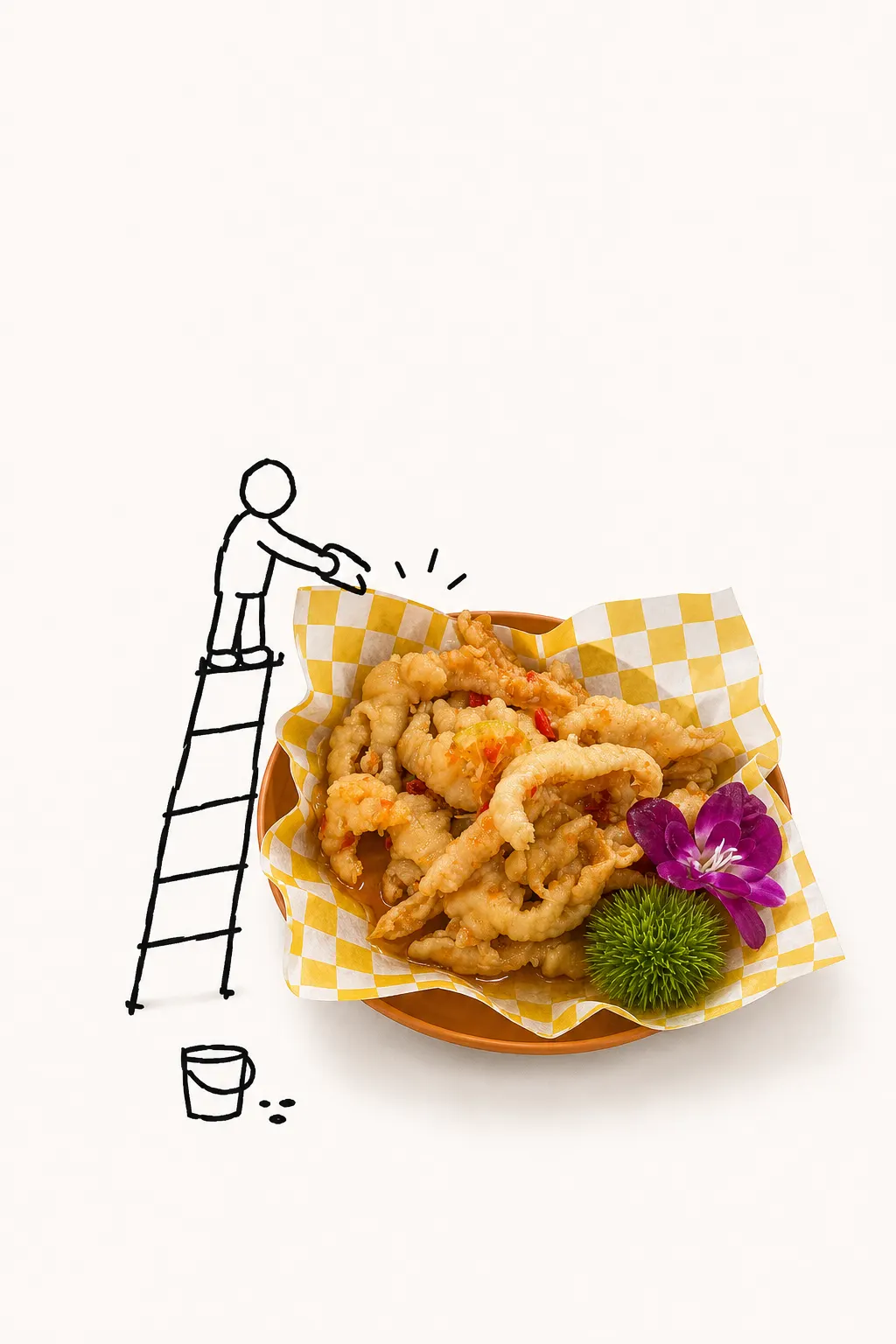
Preview: example output from Hchen1218/heytea-style by Hchen1218, reproduced under the CC-BY-4.0 licence.
Suggested prompts
Written by PicGens as starting points. Click one to copy it, then paste it to your agent once the skill is installed.
About this skill
This unofficial skill borrows the cheerful doodle look associated with the tea chain HEYTEA and applies it to any product or food photo. From one picture it makes two posters: one with a wobbly hand-lettered title and one with no text at all, where tiny stick figures tell a small story around the product.
It can go further and design a static “flavour monster” — a character derived from the drink’s ingredients and colours — and, once you approve it, compose fusion posters where that character plays with the unchanged real product. There is even an optional path that packages the approved character as a desktop pet using a bundled Electron runtime and Python build scripts. Images come from the host’s image tools. The code is MIT and the repository’s own example images are CC BY 4.0; the project is not affiliated with HEYTEA, so mind trademarks.
What it makes
Doodle posters with and without text, flavour-monster artwork, fusion posters and an optional desktop pet.
Before you install: Codex image tools; the desktop-pet path also needs Python, npm and Electron.
From the project README
Reproduced from Hchen1218/heytea-style by Hchen1218 under the MIT licence.
heytea-style
把一张生活照片变成手绘图文海报、风味小怪兽、小怪兽与真实产品互动的融合海报,或能在 macOS / Windows 桌面运行的手绘桌宠。
非官方开源视觉研究与创作工具,与喜茶不存在合作、授权或官方归属关系。
效果一:图文海报
同一张照片可以生成两种独立构图。带字版突出歪扭手绘标题;无字版不只是删掉文字,而是改用微型小人的动作讲故事。
| 原始照片 | A. 带字海报 | B. 无字海报 |
|---|---|---|
 |
 |
 |
照片上传后的三个入口
只上传照片、还没说明用途时,Skill 会先确认主体是否清晰且唯一,然后只提供三个选择:
- 生成带字版海报
- 生成不带字海报
- 生成一张风味小怪兽
如果你已经说清楚要哪种产物,Skill 会直接开始,不重复提问。“两套海报都要”仍然支持,但不会因此增加第四个默认入口。
效果二:生成风味小怪兽
风味小怪兽先作为一张静态身份稿生成,此时不检查运行器。只有你明确确认形象以后,才会继续询问:制作融合海报、制作可运行桌宠,或两者都做。
| 原始照片 | A. 写实卡通桌宠(明确请求时) | B. 风味小怪兽 |
|---|---|---|
 |
 |
 |
| 输入提供主体、色彩和材料信息 | 原主体直接成为角色,保留轮廓与关键结构 | 原图提供色彩、配料、材质及包含、沉积和覆盖关系,容器不再充当身体 |
确认后的 canonical monster 会同时锁定融合海报和桌宠动作中的身体、脸、2+2 肢体、颜色、材质与风味标记。
效果三:小怪兽与原产品互动
小怪兽身份确认后,可以重新回到原始产品照片中。原产品继续保持真实的摄影质感;怪兽锁定身体、表情、两手两腿、颜色和材质,只调整姿势,通过一个明确动作与产品产生联系。
融合海报不是把怪兽简单贴在产品旁边。每张图只选择一个主要动作,例如投、扶、抱、探、推或尝,让接触点、视线和动作轨迹共同完成一个小故事。

这个例子使用“投”:小怪兽把代表风味的黄色色块投回饮品。原产品负责真实质感,怪兽负责动作,两者形成清楚的因果关系。
效果四:让小怪兽在桌面动起来
| 动作预览 | 实际桌面尺寸 |
|---|---|
 |
 |
展开查看 v2 十二动作审核表

怎么使用
在 Codex 中上传图片,然后直接描述需要的效果:
把这张照片做成图文海报,两套都出。
把这杯饮料做成一只风味小怪兽。
这个小怪兽我确认,接着做带字和无字两张融合海报。
把这杯饮料做成写实卡通桌宠。
小怪兽身份确认前不会自动生成海报或动作。可运行桌宠仍会经过两次人工确认:先确认角色形象,再确认动作或行为;只有角色确认且用户选择继续桌宠时才检查运行环境,动作通过后才会导出透明角色包与启动入口。
安装 Skill
git clone https://github.com/Hchen1218/heytea-style.git ~/.codex/skills/heytea-doodle-poster
cd ~/.codex/skills/heytea-doodle-poster
python3 -m pip install -r requirements.txt
重新打开 Codex 后即可使用。完整工作边界见 SKILL.md,风格、流程和角色包协议见 references/。
桌宠运行器
运行器只安装一次,之后每只桌宠通过轻量角色包导入。风味小怪兽使用 schema v3,需要运行器 3.1.0 或更高版本。
在角色身份已确认、并选择继续制作可运行桌宠后,进行只读环境预检:
python3 scripts/desktop_pet.py doctor --json --required-schema 3
python3 scripts/desktop_pet.py install --json-plan
检查安装计划并明确同意后,再执行:
python3 scripts/desktop_pet.py install --yes
升级已有运行器需要额外添加 --upgrade。若 npm/Electron 下载因网络失败,加上 --mirror 走 npmmirror。源码未变时会复用本地 dist/ 已打包产物,跳过 npm ci 和 electron-builder。check_desktop_pet_environment.py / install_desktop_pet_runtime.py 是统一 CLI 的 shim。工具会保留用户目录中的旧版本备份,不会静默替换系统目录应用、绕过系统安全提示或开启登录自启。
不要直接打开 assets/desktop-pet-runtime/src/renderer/index.html;透明置顶、托盘、角色导入和桌面物理依赖 Electron 主进程。
两条桌宠产品线
| 能力 | A. 写实卡通 | B. 风味小怪兽 |
|---|---|---|
| 公开格式 | schema v2 | schema v3 |
| 身份设计 | 保留原主体轮廓与关键分区 | 根据风味信息重新设计怪兽 |
| 动作结构 | 固定 12 个动作,可选 fall / touch |
6–10 个自由行为,支持多阶段 |
| 长行为 | 整段动作循环 | enter / loop / exit 与完成事件 |
| 睡眠 | 普通动作 | 持久睡眠,可被点击或拖拽唤醒 |
| 手势 | 即时点击与拖拽 | 点击和拖拽互斥 |
| 贴地 | 统一角色锚点 | 逐帧贴地,抓取和下落阶段允许悬空 |
两个版本会编译成同一种内部行为模型,共用窗口、物理、托盘和交付链路。已有 v2 角色包无需迁移。
构建并校验仓库示例
写实卡通桌宠:
python3 scripts/desktop_pet.py pack examples/desktop-pet/pink-green-drink
风味小怪兽桌宠:
python3 scripts/desktop_pet.py pack examples/desktop-pet/pink-green-flavor-monster-v3
默认把 ZIP、审核图和启动/关闭入口写到 generated-pets/。需要只生成审核图时用 python3 scripts/desktop_pet.py review <pet-dir>。旧的 build_desktop_pet_pack.py / validate_desktop_pet_pack.py 命令仍然可用。
开发、测试与目录结构
python3 -m pip install -r requirements-dev.txt
python3 -m json.tool evals/evals.json >/dev/null
python3 -m unittest discover -s tests -v
python3 -m py_compile scripts/*.py

cd assets/desktop-pet-runtime
npm ci
npm test
npm run pack:mac   # macOS
npm run pack:win   # Windows
CI 在 macOS 和 Windows 上运行 Python 测试、Electron 单元测试及对应平台构建。
.
├── SKILL.md                         # Skill 入口与权限边界
├── references/                      # 风格、工作流与角色包协议
├── scripts/                         # 构建、校验、交付与环境工具
├── tests/                           # Python 工具测试
├── assets/desktop-pet-runtime/      # Electron 通用运行器
├── assets/examples/                 # README 自制示例
├── examples/desktop-pet/            # 可校验的 v2 / v3 角色包
└── private-assets/reference-cutouts # 研究参考素材
本地生成结果、generated-pets/、node_modules/、dist/、用户原始素材、安装后的应用和运行缓存不会进入仓库。
授权与素材边界
- 代码与运行器采用 MIT License。
- 仓库自制示例采用 CC BY 4.0;具体范围见 ASSET-NOTICE.md。
private-assets/reference-cutouts/是第三方视觉研究参考,不属于 CC BY 授权,也不能视为官方素材。- 用户应确认自己拥有上传图片及生成结果所需的使用权。
- 未获授权时,请勿加入官方 Logo、吉祥物、包装标识或合作声明。
How to install HEYTEA-Style Doodle Poster
1.Clone into Codex skills
git clone https://github.com/Hchen1218/heytea-style.git ~/.codex/skills/heytea-doodle-poster2.Install Python requirements
cd ~/.codex/skills/heytea-doodle-poster && python3 -m pip install -r requirements.txt
Licence and attribution
HEYTEA-Style Doodle Poster is created and maintained by Hchen1218 and published at github.com/Hchen1218/heytea-style under the MIT licence. The summary, suggested prompts and “About this skill” text are written by PicGens; the README section is reproduced under the project’s licence. The preview is an example image from the repository, reproduced under its licence. PicGens is not affiliated with the author.
Related skills
All skills →Canvas Design
Get an original poster or art print drawn in code, plus the design philosophy behind it.
 anthropicsGitHub stars: 179k
GC Minimal Zine Poster
Get a quiet 3:5 zine poster plus the exact prompt and recipe to make more like it.
 LiamGvchiGitHub stars: 7.2k
Monocolor Editorial Print
Get a one- or two-ink editorial print with the production prompt and a recipe to repeat it.
 yanliudesignGitHub stars: 3.3k
Yingzao
Get an art-directed editorial poster from your photo of a Chinese building, street, craft or dish.
 op7418GitHub stars: 462
Looking for prompts instead of a skill?
Browse real poster & visual prompts with the images they made, or give your agent the free PicGens template skill.