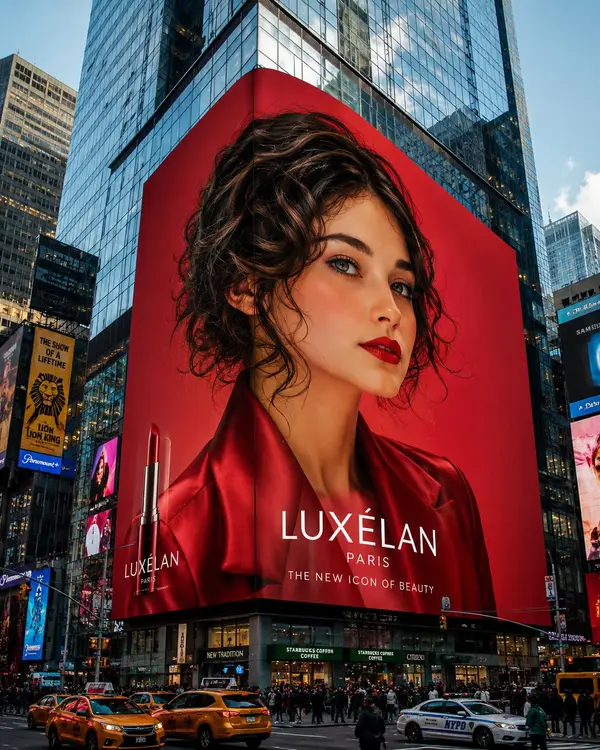
Using the provided reference image, create an ultra-realistic mega-scale luxury beauty advertising campaign displayed on a massive 3D digital billboard wrapped around the corner of a modern skyscraper in Times Square, New York. The billboard dominates the city skyline and features a breathtaking high-fashion portrait of the same woman, styled like an iconic international cosmetics ambassador. The model has long, glossy dark chocolate-brown hair with voluminous waves, flawless porcelain skin, softly sculpted features, bold defined brows, warm hazel eyes, luxurious matte crimson lips, and a confident, elegant expression looking directly at the viewer. A subtle breeze lifts strands of her hair, adding cinematic movement. She wears a tailored satin-finish crimson red blazer with sharp lapels and sophisticated luxury styling. The billboard background is a rich monochromatic red gradient with dramatic editorial lighting that makes the portrait appear larger than life. The scene is photographed from street level with a wide-angle perspective, showcasing towering glass skyscrapers, urban architecture, reflections, traffic, pedestrians, and the enormous LED display seamlessly integrated into the building façade. The billboard should resemble a world-class luxury cosmetics campaign with premium branding aesthetics and polished commercial production quality. Capture the image in photorealistic 8K, ultra-detailed skin texture, premium hair rendering, cinematic daylight, high dynamic range, architectural realism, luxury fashion advertising, editorial beauty campaign, Times Square energy, hyper-realistic digital signage, and masterpiece-quality composition. Style Keywords: mega billboard, Times Square advertising, luxury beauty campaign, high-fashion editorial, cinematic cityscape, global cosmetics ambassador, photorealistic, premium commercial photography, architectural realism, 8K, ultra detailed. Negative Prompt low quality, blurry, pixelated billboard, distorted face, extra people on billboard, malformed anatomy, unrealistic proportions, duplicate subject, cartoon, anime, CGI look, poor lighting, watermark, random text, artifacts, noisy image, low resolution, oversaturated colors, plastic skin.